

Earn Big with ELLIPAL

• High-tier Commissions • 1M+ Exposure

• Exclusive Rewards • Custom-Branded Gear

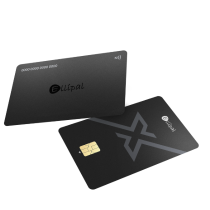
ELLIPAL X Card Icon
Join Now

Why Join ELLIPAL?

Better Basics, Bigger Payouts

  • • 15–20% Commission

  • • $200+ AOV = Bigger Payouts

  • • 90-Day Cookie Window

We Can Do More

  • Big Exposure

    Get featured to 1M+ users across our channels, we help boost your content.

  • Custom Collaboration

    Exclusive co-branded wallets for top KOLs and channels, deeply connect with your personal brand!

  • VIP Rewards

    Regular mystery gift boxes with latest gear, airdrops, and offline event invites. ELLIPAL’s way to reward you!

How It Works

Sign Up
Get Your Custom Link
Share & Earn
ELLIPAL Summer Creator Contest

One Simple Video. Earn USDT.

We bring the script. You bring the style. Turn it into a short video for a chance to earn up to 100 USDT— plus commission on every sale.

🏆 Up to10,000 USDTPrize Pool

What you can earn

20 USDT per approved video
100 USDT × 5 best videos
+ Commission on every sale

How it works

Three simple steps.

1
Get the scriptsClick to view — no signup
2
Film itAny script, your style
3
Submit & earnPost it, get paid in USDT
✅ Here are the 3 scripts — pick ONE below. Storyboards are a guide — keep the topic, the keyword phrase, the ELLIPAL solution and the CTA, and film it your way.
Already filmed & posted your video? Submit it here 👉
⚠️ Read first — the rules for every video

✅ MUST KEEP (every video)

  1. Use the given keyword phrase as your video title, and show it on your cover image (restyle it if you like, but keep the words).
  2. Hook in the first 3 seconds: open with an attention-grabbing shot or line so people stop scrolling — then stay on the script's topic. (This is required.)
  3. Show ELLIPAL as the solution (on camera or with our official visuals).
  4. Include a CTA + your affiliate link in the description.
Keyword phrase: use it as your title + show it on the cover, and include it once in your description.   Extra keywords: optional — drop them into your description if you like.   Coin: XRP or SOL — your choice.

🚫 WE CAN'T ACCEPT

  • Cover/title without the keyword phrase, or an off-topic video.
  • No hook in the first 3 seconds, or no ELLIPAL solution, or no CTA.
  • Missing your affiliate link.
  • Blank, blurry, re-uploaded, stolen, or AI-only clips with no real content.

Small issue? We'll give you one chance to fix it before rejecting.

No affiliate link yet? Get one in 1–2 min →

Want an exclusive discount code for your fans, friends or family? Email affiliate@ellipal.com with your affiliate link and we'll set one up for you.

Script 01Coinbase Account Under Review With No Timeline

Main Keyword: Coinbase account under review

Related Keywords: Coinbase account restricted · Coinbase review no timeline · Coinbase withdrawal disabled

Cover Text: Coinbase account under review | No reason. No timeline.

Creator note: Coinbase is used as the main example in this script. You may replace it throughout with another well-known exchange that you actually use. Clearly distinguish a public case from your personal experience. Do not invent a restriction or account-review story.

Scene-by-Scene Script

Scene 1 · Hook
Copy: If your Coinbase account is still under review and support only says it has been sent to an internal team, with no reason or timeline, you are not the only one.
Suggested visual: Speak to camera. Show a blurred Under Review notice on a phone. Do not reveal an account, balance or address.
Scene 2 · Real user conflict
Copy: What users repeat most is not just the restriction. It is contacting support again and again, receiving similar replies, and still having no idea when access will return.
Suggested visual: Use quick cuts of a case number, calendar pages, and similar support replies. Blur all personal information.
Scene 3 · What to do now
Copy: Follow up only through official channels. Save your case number, balance, transaction history, emails and a complete timeline. Complete any identity or source-of-funds checks the platform requests.
Suggested visual: Show a checklist: Official support · Save records · Complete verification.
Scene 4 · What not to do
Copy: Do not keep switching devices, opening new accounts or repeating transactions to get around the review. That may make the case more complicated. Never trust anyone who asks for a fee, password, verification code or recovery phrase to unlock the account.
Suggested visual: Cross out icons for a VPN, a new account, repeated transactions and an unofficial support message.
Scene 5 · Plan ahead during the review
Copy: While the account is under review, organize your records and timeline. Keep following up through official channels. At the same time, plan where each part of the balance should go once access returns.
Suggested visual: Show the case records beside a short list titled “Where the funds go next.”
Scene 6 · Reorganize after access returns
Copy: Once access returns, split the assets by purpose. If you are still trading, move the active amount to a large, locally compliant exchange with strong liquidity. If you are stepping away, use a fiat off-ramp you have already verified. Move long-term holdings to a wallet where you control the keys. Whichever route you choose, start with a small test. Confirm the arrival, then move the rest in stages.
Suggested visual: Show three routes: Keep trading · Cash out · Hold long term. Then show: Small test → Confirm arrival → Move in stages.
Scene 7 · Bring in ELLIPAL naturally
Copy: Personally, I keep my long-term holdings on an ELLIPAL X Card. It is an NFC card wallet, so I can confirm with a tap on my phone. It is simple, convenient, and makes self-custody easy to maintain.
Suggested visual: Hold the X Card and tap it to a phone. Do not show a recovery phrase, private key, address or real balance.
Scene 8 · Summary and CTA
Copy: You cannot control how long a platform takes to complete its review. But you can decide not to let one exchange account carry your entire asset plan again. Keep only the amount you need for active trading on an exchange. Prepare a verified fiat off-ramp. Move long-term holdings to a wallet where you control the keys. If your account is under review today, preserve your records, follow up through official channels, and plan where each part should go once access returns.
Suggested visual: Return to camera. Show the three asset routes again, then finish with the ELLIPAL X Card and the campaign CTA.
Script 02Can Deposit, but Can't Withdraw or Send?

Main Keyword: Coinbase withdrawal disabled

Related Keywords: exchange withdrawal suspended · can't withdraw crypto from Coinbase · move crypto off exchange · exchange to cold wallet

Cover Text: Can Deposit. Can't Withdraw?

Creator note: This script uses Coinbase as the main example. You may replace it with another well-known exchange you actually use, such as Binance, Kraken or BitMart. You may also replace the asset with BTC, ETH, XRP, SOL or USDC based on your real situation. Do not invent a personal experience just to include a popular name.

Scene-by-Scene Script

Scene 1 · Hook
Copy: Your account clearly shows BTC, XRP, SOL or USDC. Buying and depositing still work. But the moment you tap Send or Withdraw, it says Unavailable, Disabled or Paused? This problem appears again and again in Reddit user reports.
Suggested visual: Speak to camera. Show a mock balance screen, then overlay “Send Unavailable” or “Withdrawal Disabled.” Do not reveal a real account, balance or address.
Scene 2 · Real user conflict
Copy: One Coinbase user reported having about 4,000 USDC visible in the account while both sending and withdrawing were paused. Another user completed two five-dollar test transfers, then saw Send Unavailable on the third attempt.
Suggested visual: Show three text cards: Balance visible · Send disabled · Withdrawal paused. Use simulated numbers and screens. Do not present them as the Creator's own account.
Scene 3 · What to do now
Copy: Contact support only through official channels. Save the restriction screen, case number, balance, transaction history, emails and a complete timeline. If the platform requests KYC, source-of-funds documents or identity verification, follow the official process. Do not keep creating new accounts. Never trust a private message offering a paid account unlock.
Suggested visual: Show a checklist: Official support · Save evidence · Complete verification · Avoid fake support.
Scene 4 · Check which exits still work
Copy: Confirm exactly which actions are still available. Is only crypto sending disabled, or is fiat withdrawal restricted too? If a fiat off-ramp you have already verified still works, you can choose it based on your plan. If every transfer option is paused, preserve your records and continue through official support.
Suggested visual: Use a split screen: Crypto send unavailable · Fiat withdrawal available or unavailable. Do not promise that any method will remove the restriction.
Scene 5 · First step after access returns
Copy: When transfers are restored, do not send the full balance first. Start with a small test. Check the asset, network, address and any required information, such as an XRP Destination Tag. Confirm the on-chain record and actual arrival. Then move the remaining assets in stages.
Suggested visual: Show: Small test → Check network and address → Confirm arrival → Move in stages.
Scene 6 · Reorganize where the assets go
Copy: Keep the amount you actively trade on a large, locally compliant exchange with strong liquidity. If you are stepping away from the market, use a fiat off-ramp you have already verified. Move long-term holdings to a wallet where you control the keys. Also prepare a second verified deposit and withdrawal route in advance.
Suggested visual: Show three routes: Keep trading · Cash out · Hold long term.
Scene 7 · Bring in ELLIPAL naturally
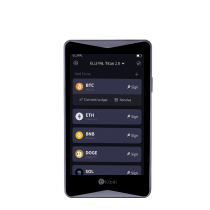
Copy: For example, I use the ELLIPAL Titan 2.0 to receive the part I plan to hold long term. It signs transactions with QR codes, so the device itself does not need a network connection. Its 4.1-inch screen also makes it easy to check the address and amount.
Suggested visual: Show the Titan 2.0, a QR-signing action, and the address-checking step. Never show a recovery phrase, private key or real balance.
Scene 8 · Summary and CTA
Copy: Once withdrawals are paused, your options become limited. The best way to reduce the risk next time is to build the process before you need it. Start with a small test. Check the network and address. Confirm the on-chain record and arrival. Then move long-term holdings off the exchange in stages. Do not let one exchange account carry your entire asset plan. If you are preparing to move crypto off exchange, start by deciding where each part should go today.
Suggested visual: Return to camera. Show the three asset routes again, then finish with the ELLIPAL Titan 2.0 and the campaign CTA.
Script 03What to Do When an Exchange Shuts Down or Leaves Your Market

Main Keyword: move crypto off exchange

Related Keywords: crypto exchange shutting down · what happens when a crypto exchange shuts down · exchange withdrawal suspended · exchange to cold wallet

Cover Text: Exchange Shutting Down? Move Before the Deadline.

Creator note: You may use BitMart, BitMEX, Bittrex or another exchange with a real, publicly documented shutdown or regional-exit announcement. You may also use BTC, ETH, XRP, SOL or USDT based on assets you actually hold or understand. Clearly distinguish a public case from your personal experience. Do not invent news or claims.

Scene-by-Scene Script

Scene 1 · Hook
Copy: If you hold BTC, ETH, XRP, SOL or USDT and your exchange suddenly announces a shutdown, the first question is not which wallet to buy. First confirm when deposits stop, when trading stops, and the last time you can still submit a withdrawal.
Suggested visual: Speak to camera. Quickly cut between the headlines of public BitMart and BitMEX shutdown announcements. Highlight “Deadline” and “Withdrawals.”
Scene 2 · Real event and user conflict
Copy: BitMEX and BitMart recently published plans to stop operating. One line from the Reddit discussion captures the problem: once your assets remain on a closing platform, they are on the platform's timeline, not yours. One XRP holder remembered years later that the assets were still on Bittrex, but the withdrawal and claim deadlines had already passed.
Suggested visual: Show public news headlines, a calendar, and a closing time window. For the Bittrex example, use the caption “XRP left on exchange.” Do not display the Reddit username.
Scene 3 · First step: use official announcements
Copy: Confirm the announcement through the exchange's official website, app and your registered email. Record the deposit deadline, trading deadline, position-closing rules, withdrawal deadline and any additional identity review. Do not rely only on a social media screenshot or a forwarded group message.
Suggested visual: Show three official sources: Official website · Official app · Registered email. Cross out unofficial DMs and forwarded messages.
Scene 4 · Stop adding risk
Copy: Once the notice is confirmed, stop depositing more assets. Follow the official rules to cancel open orders or handle unfinished positions. Download your balance, order history, transaction history and any records you may need for taxes. Never trust anyone asking for an expedited withdrawal fee, account-unfreezing fee, password, verification code or recovery phrase.
Suggested visual: Show a checklist: Stop deposits · Handle open orders · Download records · Ignore fake support.
Scene 5 · Decide where each part should go
Copy: If you still want to trade, move the amount needed for near-term trading to a large, locally compliant exchange with strong liquidity. If you are leaving the market, use a fiat off-ramp you have already verified. Long-term BTC, ETH, XRP or SOL can move to a wallet where you control the keys.
Suggested visual: Show three routes: Large compliant exchange · Verified fiat off-ramp · Self-custody for long-term holdings.
Scene 6 · Do not wait until the final day
Copy: Whichever route you choose, start with a small test. Check the asset, network, address and any required Memo or Destination Tag. Confirm the on-chain record and actual arrival. Then move the remaining assets in stages. As the deadline gets closer, withdrawal queues, manual reviews and support waiting times may increase.
Suggested visual: Show: Test → Verify → Confirm arrival → Move in stages. Then show a calendar approaching the withdrawal deadline.
Scene 7 · Bring in ELLIPAL naturally
Copy: If I have not decided where to trade or cash out yet, I move the part I am not trading to an ELLIPAL X Card. It is an NFC card wallet, so I can confirm with a tap on my phone. It is simple to use for either temporary storage or a long-term hold.
Suggested visual: Tap the X Card to a phone, then place it in a physical wallet. Never show a recovery phrase, private key, address or real balance.
Scene 8 · Summary and CTA
Copy: You cannot control when an exchange shuts down. You also cannot control when a platform leaves your region. But you can decide where your assets go next, before one announcement disrupts the entire plan. If your platform publishes a service change, check the official deadline now. Start with a small test, then move crypto off exchange according to its purpose.
Suggested visual: Return to camera. Show: Check the deadline → Choose destinations → Test first → Move in stages. Finish with the ELLIPAL X Card and the campaign CTA.
Say it your way. The storyboards are a guide, not a rule — keep the topic, the keyword phrase, the ELLIPAL solution and the CTA; everything else (shots, captions, tone, music, editing, wording) is up to you. Don't own an ELLIPAL device? Use our official product images. Fair & legal: reference only real, true facts; don't invent claims about a specific named company.

Official rules & terms

  1. Eligibility. Open to everyone worldwide, including customers, KOLs, affiliates and new creators.
  2. Requirements. Entries must meet all video requirements stated on this page. Entries that do not meet them are not eligible.
  3. Rewards. Earn 20 USDT per approved video, 100 USDT for each of the top 5 videos, plus affiliate commission on every eligible sale.
  4. Review and revisions. All entries are reviewed before approval. If a minor issue is found, you may be given one opportunity to revise the video within 48 hours.
  5. Payment. Rewards are paid in USDT to the wallet address you provide within 7 business days after the event ends. You are responsible for providing a correct and compatible address.
  6. Fair play. Original content and genuine accounts only. Duplicate, stolen, misleading or fraudulent submissions may be disqualified.
  7. Content use. By entering, you allow ELLIPAL to repost, edit or feature your submitted video across its website, social channels, advertising and other marketing materials.
  8. Accuracy and claims. Any third-party examples or claims must be factual and publicly verifiable. Do not make false, misleading or defamatory statements about any company or individual.
  9. Timeline. Videos must be published and submitted between July 29 and August 31, 2026. Please keep your video publicly accessible after submission.
  10. Changes. ELLIPAL may update, suspend or end the event when reasonably necessary and will communicate material changes where appropriate.
  11. Contact. Questions can be sent to affiliate@ellipal.com.

FAQ

No. The storyboards are a guide. Keep the topic, the keyword phrase, the ELLIPAL solution and the CTA — the rest is your call.

Yes. For coin-specific scripts, use XRP or SOL (or another major coin you hold) — just swap the coin name.

No. Screen recordings, product close-ups, voice-over or slideshows are all welcome.

Yes — true, public facts only. Don't invent claims about a named company; for dramatic points use "an exchange".

In USDT, to the address you provide, within 7 business days after the Summer Sale ends.

Ready to Earn?

Or email us directly at business@ellipal.com for a personalized welcome!

Join ELLIPAL Affiliate NOW

Excellent ELLIPAL Influencers

Access Everything You Need to Promote ELLIPAL Here

Media Kit